

Key Takeaways:
- Amazon Flex drivers are considered self-employed, which means all earnings must be reported and taxes must be paid directly to the IRS.
- Drivers are responsible for federal income tax, state income tax where applicable, and self-employment tax for Social Security and Medicare.
- Keeping accurate records of income, mileage, and expenses throughout the year helps support deductions and maintain accurate tax reporting.
- Business-related expenses such as mileage, vehicle costs, phone usage, and supplies can be deducted to reduce taxable income.
- Drivers who expect to owe at least $1,000 in taxes may need to make quarterly estimated payments to avoid penalties.
- Working with a tax professional can help improve accuracy, identify deductions, and manage more involved tax situations.
As its name suggests, Amazon Flex gives you a flexible way to earn money. But since drivers are independent contractors, Amazon doesn’t withhold income taxes, Social Security, or Medicare from your pay. This means you’re responsible for tracking your earnings, reporting income, and paying taxes directly to the IRS.
Many drivers are surprised by how different this arrangement is from traditional employment. Not only do you have to calculate self-employment tax, but you also need to know which forms to file and what expenses qualify as deductions. In this Amazon Flex tax guide, we explain what you need to know to stay compliant and how an experienced CPA can help you handle your tax obligations the right way.
USA Tax Gurus is a team of enrolled agents and licensed CPAs who can help you take control of your business finances to maximize profits, reduce taxes, and provide increased financial clarity. We’re QuickBooks Pro Advisors, but our tech-savvy team can work in almost any accounting platform, including Wave, Zoho, and more. Schedule your free consultation today with a member of our team to learn more!
What Is Amazon Flex?
Amazon Flex is a delivery program that allows people to earn money by delivering packages using their own vehicles. Instead of working as employees, drivers sign up through the Amazon Flex app and select delivery blocks based on their availability. Earnings may include:
- Base pay set by Amazon
- Tips for certain types of deliveries, such as grocery orders
- Incentives during high-demand periods
As an independent contractor, you’re responsible for tracking what you earn, keeping records of expenses, and reporting everything on your tax return. Although many drivers embrace Amazon Flex for its freedom and flexibility, most would agree that tax time can get complicated, especially if you’ve never been your own boss before.
Are Amazon Flex Drivers Self-Employed?
Yes, Amazon Flex drivers are considered self-employed by the IRS. This places you in the same category as freelancers, consultants, and small business owners. You control your schedule, choose when to accept delivery blocks, and use your own vehicle and resources to complete deliveries. In return, you take on full responsibility for reporting your income and paying taxes.
Self-employment status also changes how your taxes are calculated. In addition to regular income tax, you’re responsible for self-employment tax, which covers Social Security and Medicare contributions. This is usually handled through Schedule SE when filing your return.
Treating your Amazon Flex work like a business can help you stay organized and reduce your tax liability. Keeping accurate records, tracking expenses, and setting aside money for taxes throughout the year can make filing much easier and help you avoid surprises.
Pro Tip: All income must be reported, regardless of the amount or whether you receive a tax form from Amazon. If your earnings don’t meet the threshold for a 1099 form, you’re still required to include that income on your tax return.
What Taxes Do Amazon Flex Drivers Pay?
Unlike traditional employees who have taxes deducted from each paycheck, you receive your full earnings upfront. This means you need to plan ahead and set aside a portion of your income for taxes. Failing to do so can lead to unexpected tax bills and potential penalties when you file your return.
Federal Income Tax
Federal income tax applies to your total taxable income, which includes your Amazon Flex earnings. The IRS uses a progressive tax system, meaning your income is taxed at different rates depending on how much you earn. As your income increases, portions of it are taxed at higher rates based on your filing status.
State Income Tax
Most states require residents to pay income tax on earnings. The rates and rules vary depending on where you live: some states use a flat rate while others follow a progressive schedule similar to federal taxes. A few states don’t impose income tax at all, which can lower your overall tax burden.
Pro Tip: If you complete deliveries in more than one state, you may need to review filing requirements in each location. In some cases, you may have to file a nonresident return depending on where the income was earned.
Self-Employment Tax
Self-employment tax covers your contributions to Social Security and Medicare, which are usually split between employers and employees in traditional jobs. The current self-employment tax rate is 15.3 percent, which includes 12.4 percent for Social Security and 2.9 percent for Medicare.
Tax Forms for Amazon Flex Drivers
Amazon Flex drivers must file specific IRS forms to report their income and calculate taxes owed. Since you’re self-employed, your tax return includes extra schedules beyond the standard Form 1040.
1099-NEC
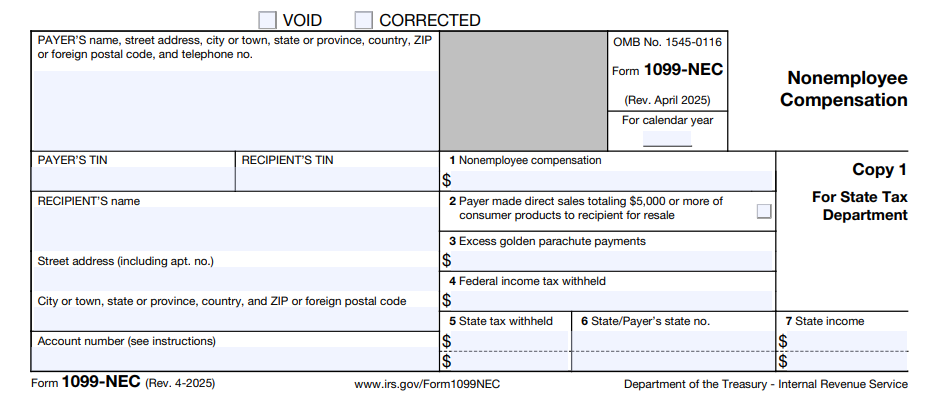
Form 1099-NEC reports non-employee compensation paid to independent contractors. Amazon typically issues this form if your earnings meet or exceed $600 during the year. It shows the total amount paid to you (and also reported to the IRS). Your Amazon Flex earnings summary can help you confirm your total income.
1099-K (If Applicable)
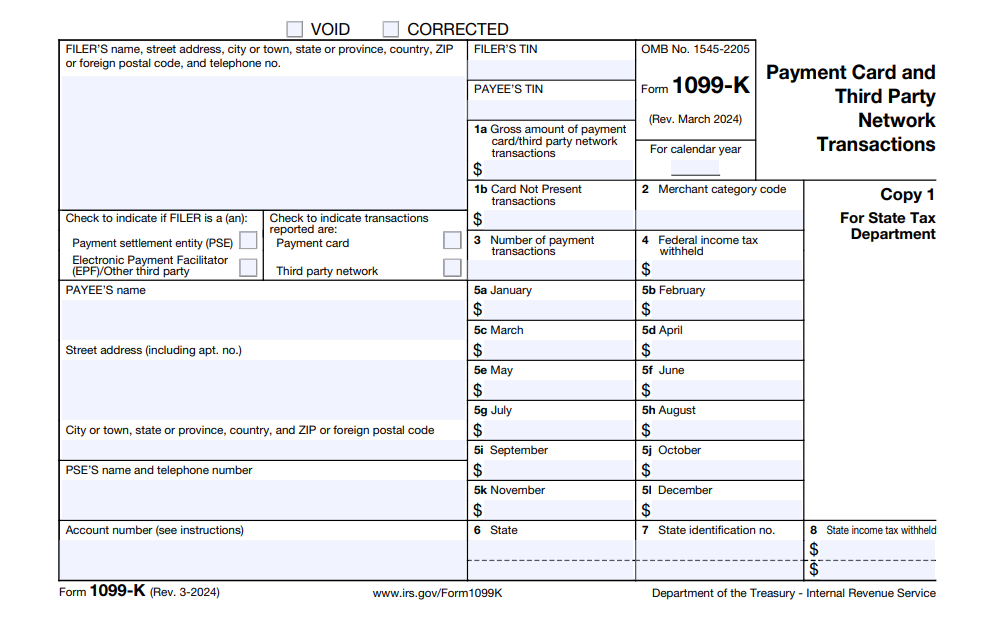
You may receive Form 1099-K if payments are processed through a third-party payment platform. This form reports total payment transactions rather than just income, which can sometimes include amounts that aren’t fully taxable. Make sure you report all income earned through Amazon Flex based on your actual earnings.
Schedule C (Form 1040)
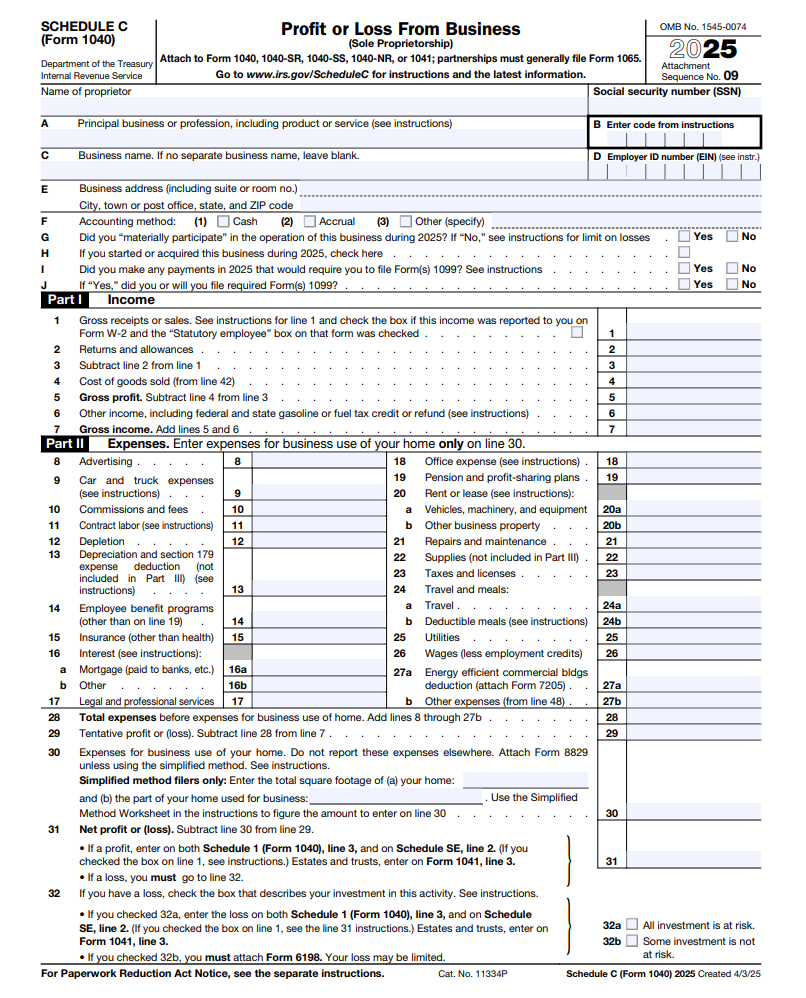
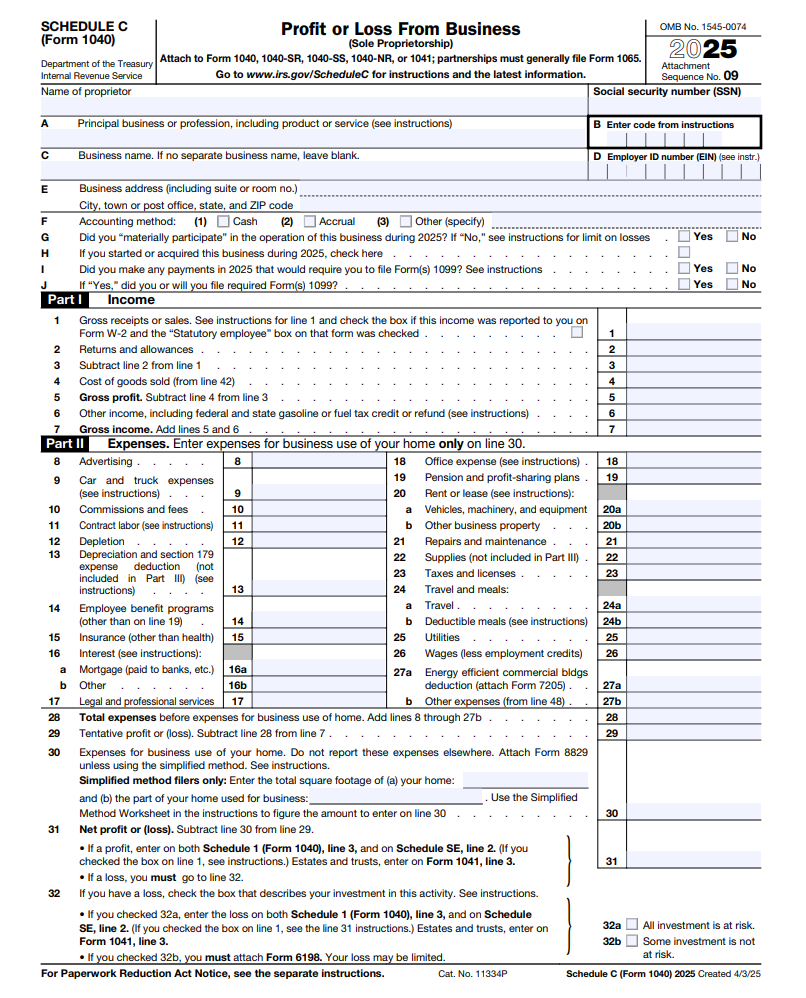
Schedule C is used to report your business income and expenses as a self-employed individual. This is where you list your total earnings from Amazon Flex and subtract any eligible deductions. The result is your net profit or loss for the year, which helps determine how much tax you owe.
Schedule SE
Schedule SE is used to calculate your self-employment tax based on your net earnings. The amount is then added to your overall tax liability on your return. This is separate from your regular income tax calculation.
Although you’re responsible for the full self-employment tax, you can deduct a portion of it as an adjustment to income. This deduction helps reduce your overall taxable income. Including Schedule SE ensures your Social Security and Medicare contributions are properly reported.
Form 1040
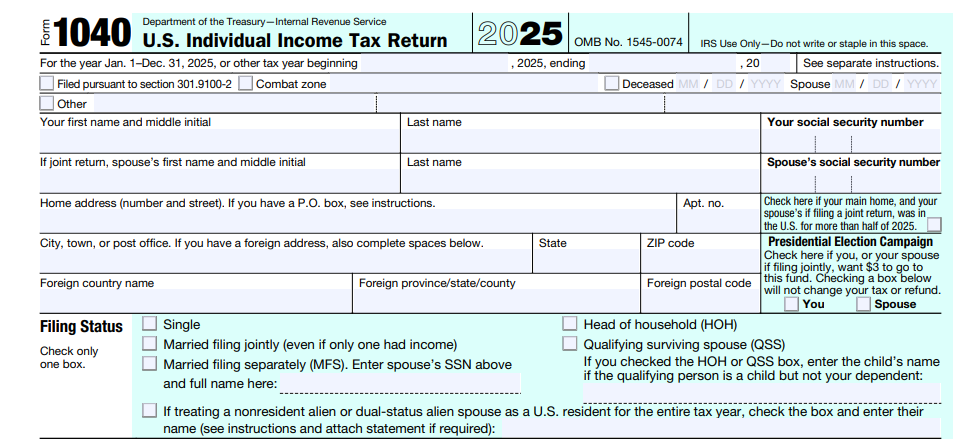
Form 1040 is your main individual income tax return. It combines all your sources of income, as well as deductions and credits, to determine your final tax liability. The information from Schedule C and Schedule SE flows into this form. After completing Form 1040, you’ll know whether you owe additional taxes or are entitled to a refund.
How to Report Amazon Flex Income
Since you’re self-employed, the IRS expects you to maintain accurate records and calculate your income independently. This includes verifying totals, applying deductions, and reporting the correct figures on your tax return.
Step 1: Gather Your Income Records
Begin by collecting all records related to your Amazon Flex earnings for the year. This includes any 1099 forms issued to you, along with your earnings summaries from the Amazon Flex app. Be sure to review these records carefully and confirm that they match your own totals.
Step 2: Calculate Total Gross Income
After gathering your records, calculate your total gross income from Amazon Flex. This includes all payments received, such as:
- Base pay for delivery blocks
- Tips
- Any bonuses or incentives
Gross income represents your total earnings before any deductions are applied. This figure, therefore, serves as the starting point for determining your taxable income.
Step 3: Identify and Subtract Business Expenses
Once your gross income is determined, identify all eligible business expenses related to your delivery work. Common deductions include:
- Mileage
- Vehicle maintenance
- Fuel
- Insurance
- Phone usage
- Delivery supplies
These expenses reduce your taxable income and can significantly lower your tax liability. However, you’ll need to make sure each one is directly related to your business activity and properly documented.
Step 4: Calculate Net Profit
Your net profit is calculated by subtracting your total business expenses from your gross income. This figure, which represents your taxable business income, is used to determine both your income tax and self-employment tax obligations.
Step 5: Report Income and Expenses on Schedule C
After calculating your net profit, report your business income and expenses on Schedule C (Form 1040). This form provides a detailed summary of your Amazon Flex activity, including total income, deductions, and final profit or loss. The net profit from Schedule C is then used in other parts of your tax return.
Step 6: Transfer Totals to Form 1040 and Calculate Taxes
Once Schedule C is complete, transfer the relevant figures to your Form 1040. Your net profit will be included in your total income, and your self-employment tax will be calculated separately using Schedule SE. These amounts are then combined to determine your total tax liability.
What Expenses Can You Claim as an Amazon Flex Driver?
One of the main advantages of being self-employed is the ability to deduct business expenses from your income. To claim deductions properly, expenses must be ordinary and necessary for your delivery work and supported by accurate records.
Vehicle Expenses
Vehicle expenses are usually the largest deduction for Amazon Flex drivers. The IRS allows you to choose between the standard mileage rate and the actual expense method.
- Standard Mileage Rate: The standard mileage rate lets you deduct a fixed amount per business mile driven. This rate, which is updated annually by the IRS, includes costs such as fuel, maintenance, and depreciation. To use this method, you must keep a detailed mileage log that records business-related trips.
- Actual Expense Method: The actual expense method allows you to deduct the business portion of your total vehicle costs. This includes expenses such as gas, repairs, insurance, registration, and depreciation. While this method can result in larger deductions in some cases, it involves more detailed record-keeping.
| Deduction Method | What It Captures | Recommended For |
| Standard Mileage Rate | A mileage rate set annually by the IRS (72.5 cents per mile in 2026) | Amazon Flex drivers who drive a lot |
| Actual Expense Method | Gas, vehicle maintenance, auto insurance, vehicle depreciation | Amazon Flex drivers with high vehicle-related expenses |
Phone Expenses
You have to use your phone to access the Amazon Flex app and manage routes, so you can deduct the business use portion of your phone bill. This involves calculating the percentage of time your phone is used for work versus personal use. For example, if you use your phone 60 percent of the time for deliveries, you can deduct 60 percent of your monthly bill.
Supplies and Equipment
Amazon Flex drivers may incur costs for supplies and equipment used during deliveries. This may include items such as:
- Insulated delivery bags
- Phone mounts
- Flashlights
- Safety gear
While these expenses may be smaller compared to vehicle costs, they can still add up over time. Keeping receipts and tracking purchases helps you take full advantage of these deductions.
Other Deductible Expenses
Other costs that may qualify as deductions include:
- Tolls
- Parking fees
- Navigation apps and route planning tools
- Subscription services used to support your delivery work
- Expenses for tax preparation software or professional tax services
What are the Due Dates for Quarterly Estimated Tax Payments?
The IRS divides the tax year into four payment periods, each with its own deadline. These dates don’t follow standard calendar quarters, so track them carefully.
- April 15 for income earned from January through March
- June 15 for income earned from April through May
- September 15 for income earned from June through August
- January 15 of the following year for income earned from September through December
You’re generally required to make estimated payments if you expect to owe at least $1,000 in total tax for the year after subtracting credits and any withholding from other income sources. If you don’t meet this threshold, quarterly payments may not be necessary. However, many drivers still choose to pay throughout the year to avoid a large balance due when filing.
How Do You Calculate Estimated Tax Payments?
To calculate estimated payments, project your total income for the year from Amazon Flex and any other sources. Then subtract your expected business expenses to determine your estimated net profit. This amount is used to calculate both income tax and self-employment tax.
You can estimate your tax using current IRS tax brackets and self-employment tax rates. Many drivers also refer to their prior-year tax return to guide their calculations, especially if income levels remain similar. This approach helps produce more accurate payment amounts and reduces the chance of underpayment.
How Do You Submit Estimated Tax Payments?
Estimated tax payments can be made using several IRS-approved methods. Common options include:
- IRS Direct Pay
- The Electronic Federal Tax Payment System (EFTPS)
- Payments made by debit or credit card
You can also mail payments using Form 1040-ES vouchers, although electronic payments are generally faster and easier to monitor. Regardless of the method used, keeping records of each payment is important for accurate reporting when filing your return.
How to Keep Track of Amazon Flex Expenses
Since you’re responsible for reporting your own income and expenses, maintaining organized records helps ensure your tax return is accurate and complete. Here are some recommended steps:
- Track Your Income Carefully: You should maintain a record of all payments received through Amazon Flex. This includes base pay, tips, bonuses, and any additional incentives.
- Maintain a Mileage Log: Tracking mileage is especially important for delivery drivers. If you use the standard mileage rate, you must maintain a log that records your business miles driven. This log should include the date, starting point, destination, and purpose of each trip.
- Keep Receipts and Expense Records: You should keep receipts for all business-related expenses, including fuel, maintenance, supplies, tolls, and parking fees. Digital copies are acceptable, so scanning or storing receipts electronically can make organization easier.
- Use Separate Accounts for Business Activity: Using a separate bank account for your Amazon Flex earnings makes it easier to stay organized. It can also simplify bookkeeping and reduce confusion during tax season.
Common Mistakes to Avoid With Amazon Flex Taxes
- Not Reporting All Income: One of the most common mistakes is failing to report all income earned through Amazon Flex. Some drivers assume that if they don’t receive a 1099 form, they don’t need to report that income. In reality, the IRS requires you to report all earnings, regardless of whether a form is issued.
- Failing to Track Mileage: Mileage is one of the largest deductions available to delivery drivers, yet it’s frequently overlooked or estimated without proper records. The IRS usually asks for a detailed mileage log to support this deduction, but not all Amazon Flex drivers keep one..
- Not Setting Aside Money for Taxes: Since Amazon doesn’t withhold taxes, it’s easy to spend your full earnings without reserving funds for tax payments. This can lead to a large balance due when filing your return. Setting aside a percentage of your income throughout the year helps prevent this issue.
- Mixing Personal and Business Finances: Combining personal and business expenses can make it harder to track deductions and calculate accurate totals. This can lead to missed deductions or incorrect reporting. Using a dedicated account for your Amazon Flex activity can simplify bookkeeping.
- Missing Quarterly Tax Payments: Some drivers overlook the need to make quarterly estimated tax payments. If you owe enough tax and fail to pay during the year, the IRS may apply penalties and interest. Paying only at the end of the year doesn’t always prevent these charges.
When to Hire a Tax Professional for Your Amazon Flex Taxes
As your income grows or your filing requirements become more involved, working with a tax professional can keep you compliant while helping you avoid mistakes like those listed above. If any of the following apply to you, schedule a consultation with a tax professional who supports gig workers.
- Multiple Income Sources: If you earn income from Amazon Flex along with other gig platforms or traditional employment, your tax return can be more complicated. Each income stream must be reported accurately, and combining them increases the chance of inconsistencies if records aren’t well organized. A tax professional can help you make sure all income is included and properly reported.
- Higher Earnings: As your income increases, your tax liability may rise due to higher tax brackets and self-employment tax. When you hire a tax accountant, they can calculate your higher tax obligations accurately.
- Large Expense Deductions: When you’re claiming higher deductions, missing documentation or incorrect entries can lead to adjustments or penalties. A tax professional can review your expenses and confirm that everything is in line with IRS requirements.
- Estimated Tax Uncertainty: If you’re unsure how much to pay in quarterly estimated taxes or when payments are due, errors can lead to penalties. Professional guidance can help you stay current and avoid underpayment.
- Time Constraints: Preparing a self-employment tax return takes time, especially if your records aren’t fully organized. Reviewing income, categorizing expenses, and completing necessary forms can become time-consuming, but a tax professional can reduce that workload.
Speak to an Amazon Flex Tax Accountant Now
Amazon Flex is a flexible way to earn income, but it also comes with more complicated tax responsibilities. If you’d rather not handle everything on your own, USA Tax Gurus LLC provides tax filing, planning, bookkeeping, and advisory services for both individuals and businesses across the United States. Our team includes CPAs, Enrolled Agents, and tax professionals who work with clients in over 30 states and offer services tailored to self-employed individuals. To get started or schedule a consultation, please fill out our contact form or call 213-204-8737 today.
Amazon Flex Tax FAQS
What if I Only Drive Amazon Flex Part-Time?
Part-time drivers still have to report all income earned through Amazon Flex, even if it’s a small amount. The IRS does not exempt income based on how frequently you work, so even occasional driving activity must be included on your tax return.
How Does Amazon Flex Income Affect Other Tax Credits Or Benefits?
Since your Amazon Flex earnings are treated as self-employment income, they increase your total adjusted gross income, which is used to determine qualification for credits such as the Earned Income Tax Credit or Child Tax Credit. It can also affect income-based programs like student aid or healthcare subsidies. Keeping accurate records and reviewing your total annual income can help you anticipate how your Amazon Flex earnings may influence your overall tax situation.
Can You Write Off A Portion Of Your Car Purchase For Amazon Flex?
In some cases, you may be able to deduct part of your vehicle cost if you use it for Amazon Flex deliveries. This is typically done through depreciation under the actual expense method rather than the standard mileage rate.
The deduction is based on the percentage of time the vehicle is used for business purposes. For example, if you use your car 70 percent for deliveries, you may be able to deduct 70 percent of eligible vehicle expenses, including depreciation.
Sources
- https://www.irs.gov/forms-pubs/about-form-1099-nec
- https://www.irs.gov/businesses/understanding-your-form-1099-k
- https://www.irs.gov/forms-pubs/about-schedule-c-form-1040
- https://www.irs.gov/forms-pubs/about-schedule-se-form-1040
- https://www.irs.gov/forms-pubs/about-form-1040
- https://www.irs.gov/payments/direct-pay-with-bank-account
- https://www.irs.gov/payments/eftps-the-electronic-federal-tax-payment-system